Touchgrind Scooter
Illusion LabsSports
3.3517.00 Reviews
- Version
- 1.3.44
- Installs
- 5.00M
- Age Rating
- Everyone
Screenshots
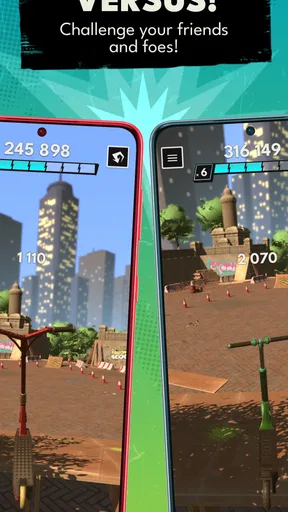
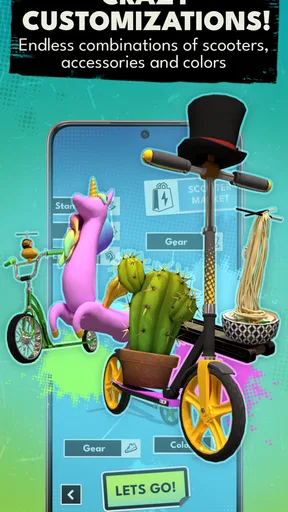
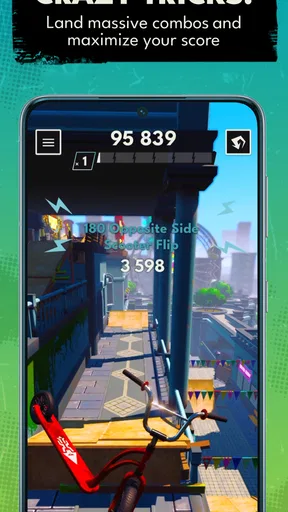
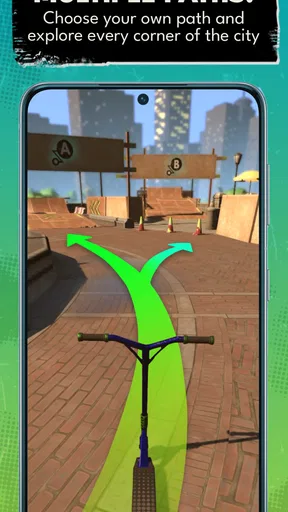
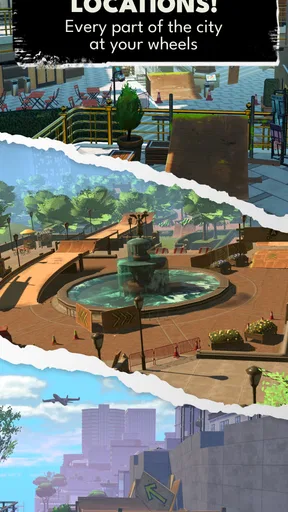
Our Review of Touchgrind Scooter
 Analysis by Appyee
I like sports games that understand the difference between looking impressive and feeling good in your hands. Touchgrind Scooter aims squarely at the second goal: it turns scooter riding into a gesture-driven challenge where your fingers control the movement, balance, and timing. After spending time with it, I found that its most important capability is not simply performing tricks. It is the way the game makes every landing feel earned through touch.
That focus gives this free sports game from Illusion Labs a distinctive personality. It is available for players rated Everyone, runs on devices using iOS 10 or later, and has passed five million installs. Its average rating sits at 3.3 from roughly thirteen thousand ratings, which tells me the experience is appealing but not universally comfortable. I understand that split: the game can be satisfying once its controls click, but the learning curve is sharper than the bright presentation first suggests.
The game was released on December 8, 2021, and its current version is 1.3.44. It is free to start, with optional purchases ranging from $0.99 to $27.99 per item. I would not approach it as a relaxed arcade title where every attempt immediately looks stylish. I would approach it as a compact practice game, ideal for short sessions in which I repeat a movement, adjust my timing, and gradually make a run cleaner.
Why touch control is the whole experience
I see this section as a closer look at why the controls shape every other part of the experience: how I set goals, respond to mistakes, and decide whether another attempt is worthwhile. That connection also makes the game’s pacing easier to judge, because progress depends less on rushing through content and more on making each input feel intentional.
The central capability is direct finger control
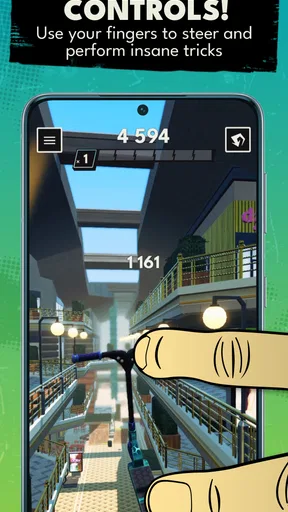
The defining idea is simple to describe but more interesting to use: I do not steer a scooter with a conventional virtual joystick and then press separate buttons for tricks. My fingers interact directly with the rider and scooter through swipes, taps, and directional movement. That makes the screen feel less like a dashboard and more like a small performance space.
This matters because a trick is not just a menu choice. The direction and timing of my gesture affect what happens next, while the landing still demands attention. When I rush, the mistake feels connected to my input instead of random. When I get a sequence right, I can usually identify the reason it worked. That sense of responsibility is the strongest part of the design.
In many mobile sports games, the first few minutes are spent learning which button triggers which animation. Here, the challenge is closer to learning a physical motion. I have to build a mental connection between finger movement and scooter movement. That can feel awkward at first, especially if I expect the game to interpret broad swipes generously. It rewards deliberate gestures more than frantic ones.
The real strength is feedback through correction: a failed attempt gives me a reason to adjust rather than merely telling me that I lost. I may have started a movement too late, released too early, or tried to combine actions before I was ready. This makes the game unusually suitable for players who enjoy refining technique, not just collecting quick wins.
What the control style changes
Direct touch control also changes how I look at the environment. I am not only searching for ramps or open space. I am judging whether I have enough room to prepare a gesture, whether a landing will leave time for the next movement, and whether I should attempt a safer line instead of chasing a more dramatic one.
That extra layer gives ordinary movement more importance. In a button-based game, travel can feel like the part between tricks. Here, positioning and timing are part of the trick attempt. A small mistake before a jump can ruin a sequence that would otherwise have been successful, so I learned to treat the approach as carefully as the action itself.
The result is a game that feels more tactile than a typical casual sports title. It is also less immediately accessible. Someone looking for a game that can be played with one thumb while barely watching the screen may find this demanding. The same quality that creates depth can make the first session feel resistant.
Learning without turning every attempt into a chore
I found the best way to learn was to isolate one movement at a time. Instead of trying to produce a long, flashy run, I repeated a basic action until the finger motion felt natural. Then I added another movement and paid attention to the transition. This approach is slower than experimenting randomly, but it gives useful information after each attempt.
There is a practical lesson here for younger players too. The Everyone rating makes the game broadly approachable in terms of content, but that does not mean every player will find the controls easy. A child who enjoys repetition and physical game-like challenges may have a great time. A child expecting instant success may become frustrated quickly unless someone explains that failure is part of learning the gestures.
I also recommend playing with the device held comfortably and keeping the input area clear of accidental touches. Because the game depends on precise movement, a cramped grip can make a good gesture feel inconsistent. This is not a feature claim; it is simply the kind of everyday adjustment that makes a touch-sensitive game easier to judge.
How it feels in an ordinary play session
An ordinary session is most satisfying when I give it a small, practical target rather than expecting a constant stream of new surprises. I’ll look at how that approach fits into brief breaks, and why the same repetition can feel either absorbing or tiring depending on my attention and mood.
Short attempts work better than marathon sessions
My favorite way to play is in short bursts. If I have a few minutes before leaving home or need a quick break between tasks, I can attempt a route, notice one weak point, and try again with a specific correction in mind. That structure suits the game better than opening it without a plan and expecting endless variety to carry the session.
A realistic example is a commute where I am waiting for a bus. I might play with the sound low, attempt a few runs, and concentrate only on landing one movement consistently. If I succeed, I can move on to a harder combination. If I fail, the session still has a clear purpose because I know what to practice next. The game feels more rewarding when I give each attempt a small objective.
Longer sessions can become repetitive if I am not actively improving. The appeal comes from control mastery, so once my attention fades, the same gestures can start to feel like work. I would not choose it as my main game for a long flight unless I already enjoyed its mechanics and wanted to practice. For a quick skill-focused diversion, it fits much better.
Why the camera and fingers demand concentration
The visual presentation is built to make movement readable and tricks exciting, but the screen can become busy when several actions happen close together. I learned not to watch only the scooter. I also watched the space where my finger needed to move next. That habit helped me avoid making a correct gesture in the wrong place or at the wrong moment.
This is one of the less obvious trade-offs of the design. The game asks me to divide attention between what the rider is doing and what my hand is doing. That is why the first few attempts can feel less intuitive than a traditional sports game. Once I develop a rhythm, the two forms of attention begin to work together, but reaching that point takes patience.
For that reason, I would avoid playing while walking, crossing a street, or doing anything that already requires visual attention. It is a game that benefits from looking at the screen, even during a brief session. The best casual use is stationary: sitting at a desk, waiting in a safe place, or relaxing at home.
Where the free model fits into the experience
The game costs nothing to begin, which makes it easy to test whether the touch system suits me before spending anything. That is important here because the controls are personal. Some players will enjoy the direct gestures immediately; others will decide that a conventional joystick is more comfortable.
Optional purchases are available, priced from $0.99 to $27.99 per item. I would treat those as a separate decision from judging the core handling. My advice is to play long enough to understand whether I enjoy repeating attempts before considering any purchase. A payment cannot remove the central learning curve, and the main question is whether I like the act of controlling the scooter.
This also makes the game easier to recommend to families cautiously. The age rating is Everyone, but parents may still want to explain that free games with optional purchases deserve the usual device-level spending safeguards. The rating describes the content audience; it does not tell me whether the payment structure suits a particular household.
The best scenario for Touchgrind Scooter
The game is at its best when I have a little time, a comfortable place to hold my device, and enough focus to notice what changed between attempts. This section considers who is likely to enjoy that kind of practice, while also clarifying when a broader or more forgiving sports game makes more sense.
It shines when I want a skill to improve
The strongest use case is a player who likes measurable personal progress without needing a story campaign or a large social layer. I can open the game with one narrow goal: land a movement cleanly, connect two actions, or stop making the same timing error. That makes each session feel purposeful even when it is brief.
I also see it working well for fans of skateboarding and scooter games who want more involvement than tapping a trick icon. The hand-to-screen relationship gives the game a different flavor from a standard arcade sports title. It is not trying to simulate every part of riding realistically; instead, it turns the performance into a tactile puzzle that I solve through timing.
Another good scenario is sharing the device with a friend for informal challenges. Even without treating it like a serious competition, it is easy to compare who can make a movement look cleaner or who can recover from a difficult approach. The game’s appeal in that setting comes from watching someone else discover the controls, then trying the same movement yourself.
Who should choose another kind of sports game
I would skip it if I want realistic team sports, licensed athletes, managerial depth, or a long progression built around matches. This is not a substitute for football, basketball, racing, or a conventional skateboarding simulation. Its focus is much narrower: controlling a scooter through gestures and improving performance through repetition.
I would also recommend a different option to anyone who dislikes trial and error. The game is not at its best when I treat failure as wasted time. It assumes that I will replay a section, notice a mistake, and refine the input. Players who prefer immediate rewards, automatic trick chains, or simple one-touch controls may find the experience more irritating than entertaining.
Compared with usual arcade sports games, this one offers more physical involvement but less instant accessibility. Compared with simulation-style alternatives, it is lighter and more abstract, yet the gestures can feel more demanding because I am responsible for them directly. That middle position is its identity, and it is also the reason it will not suit everyone.
The trade-offs that become clear after practice
Practice makes the control style easier to understand, but it does not remove every point of friction. I’ll weigh the satisfaction of correcting a movement against the attention and patience it asks for, including a few small habits that can prevent avoidable input mistakes.
Precision creates satisfaction and frustration
The same precision that makes a successful landing satisfying can make a failed run feel harsh. If I am tired or distracted, my gestures become less consistent, and the game does not always feel forgiving. That is not necessarily poor design; it is the natural cost of making touch input the main mechanic. Still, it affects how often I want to play.
I found that frustration usually came from attempting too much too soon. Combining several movements before mastering their individual timing made the game seem unpredictable. Breaking the sequence into smaller parts revealed that the system was easier to understand than my first impression suggested. This is a useful tip for new players: reduce ambition before blaming the controls.
Another trade-off is that the game’s strongest moments depend on concentration. I cannot fully appreciate the tactile challenge if I am constantly switching apps, responding to messages, or playing in a noisy situation. It is casual in session length, but not always casual in attention. That distinction is easy to miss from the store summary alone.
Performance depends on comfort as much as skill
Hand position matters more than I expected. Holding the phone too tightly restricts the gesture, while changing grip halfway through a run can affect timing. I had better results when I supported the device with one hand and kept the other free for deliberate movements. On a larger screen, I would take a moment to find a comfortable reach before attempting difficult sequences.
Screen cleanliness also matters for a gesture-focused game. A finger that drags unevenly can turn a movement into a mistake, especially when I am already trying to time a landing. Keeping the display clear and avoiding overly fast swipes made the input feel more dependable. These small habits do not change the game, but they reduce avoidable friction.
I would not judge the experience solely from the first five minutes. The early control barrier is real, but it is also the part that can soften with practice. At the same time, I would not promise that everyone will eventually enjoy it. Some people simply prefer buttons, and no amount of learning changes that preference.
What the rating suggests to me
The average rating of 3.3, based on about thirteen thousand ratings, feels consistent with a game that has a clear audience but a divisive control style. Its install count of over five million shows that the concept has reached a substantial mobile audience, yet popularity does not erase the need to understand what kind of player it serves.
I read those figures as a reason to try rather than a reason to assume. A player who loves gesture-based mastery may rate it much more highly than someone who expected a simple scooter arcade game. The title is free, so the sensible test is personal: spend a few sessions learning the handling, then decide whether the repetition feels rewarding or exhausting.
Who gains the most from the game
The best match is not simply anyone who likes scooters; it is someone who enjoys learning through repetition and wants a focused mobile sports challenge. I’ll finish by weighing that fit against the needs of players who would rather have instant control, wider sports options, or a more relaxed game to dip into.
The ideal player profile
I would recommend it most strongly to players who enjoy precision, repetition, and the small satisfaction of turning an awkward motion into a reliable one. It is especially suitable for someone who wants a sports game that can be played in short sessions but still offers room to improve. The direct touch system gives experienced players something to refine without requiring a complicated control layout.
It is also a good fit for someone curious about how mobile controls can change a familiar action. The scooter theme is easy to understand, but the interaction is not just a simplified version of a console controller. The game asks me to use the screen as an active surface, and that makes it more memorable than a generic trick game.
New players should begin patiently. I would choose a quiet place, use a comfortable grip, and practice one gesture until I could repeat it without thinking through every finger movement. Then I would add complexity gradually. That workflow is more effective than chasing the most spectacular trick immediately, and it gives a clearer answer about whether the game’s core appeal is right for me.
Who will probably be happier elsewhere
I would point a casual arcade fan toward another sports game if they want instant control, quick rewards, or a forgiving experience that works while multitasking. I would also suggest a broader sports title to anyone looking for teams, seasons, realistic competition, or a large range of activities. This game is specialized, and its specialization is both its charm and its boundary.
Players with limited patience for repeated attempts should be honest about that before installing. The free entry removes the financial barrier, but it does not remove the time needed to learn. Likewise, anyone uncomfortable with optional in-app purchases should review their device settings before handing the game to a child, even though the content rating is Everyone.
My recommendation after using it
My overall view is positive but specific. I would recommend Touchgrind Scooter to a friend who enjoys touch-driven challenges and wants a compact sports game built around control rather than spectacle alone. I would not recommend it as a universal scooter game, because its gestures demand more patience than many players expect from a free mobile title.
The developer, Illusion Labs, has chosen a focused idea instead of filling the experience with unrelated systems. When the controls match my mood and attention, that focus works beautifully: a short attempt can become a satisfying exercise in timing, balance, and correction. When I want something effortless, it feels too exacting.
My final advice is to judge the game by the feeling of improvement, not by the first failed run. Give the touch controls a fair practice session, use short goals, and decide whether each retry teaches you something. If that process sounds enjoyable, this is an unusually tactile sports game worth keeping. If it sounds like a chore, another arcade alternative will probably serve you better.
Verdict
Strengths of Touchgrind Scooter
- Responsive controls make scooter tricks feel precise and satisfying.
- Compact levels are ideal for quick sessions on mobile.
- Stylish visuals and smooth animations create a polished presentation.
- Unlockable scooters and customization add useful progression.
- Physics-based challenges offer plenty of room to improve skills.
Limitations of Touchgrind Scooter
- Some advanced tricks require considerable practice to perform consistently.
- Progress can feel slow when unlocks depend on repeated challenges.
- Occasional camera angles make landing certain tricks more difficult.
- The game may become repetitive after mastering the available locations.
- Performance can vary on older devices during visually busy scenes.
Other Releases by Illusion Labs
View All


Similar Picks in This Category
View All
8 Ball Pool
Miniclip.com4.8

Pooking - Billiards City
AIM TOP GAME TECHNOLOGY LIMITED - pool4.6

Carrom Pool: Disc Game
Miniclip.com4.4

EA SPORTS FC Soccer Mobile 26
ELECTRONIC ARTS4.6

World Soccer League
mobirix4.3

Soccer Cup 2026: Football Game
INLOGIC SPORTS - football tennis golf soccer4.3
Frequently Asked Questions
What is Touchgrind Scooter and how does the gameplay work?
Touchgrind Scooter is a physics-based scooter game in which you control a stunt scooter using touchscreen gestures. After choosing a scooter and rider, you swipe, tap, and hold to steer, jump, perform tricks, and land safely. The controls are simple to understand but require practice, especially when combining tricks, maintaining balance, and completing objectives in more demanding levels.
Is Touchgrind Scooter free to download and play?
Touchgrind Scooter can generally be downloaded for free on supported Android and iOS devices, but the free version may include optional in-app purchases, advertisements, or limitations on certain content. Players should check the store listing for the current pricing and purchase details. The game can be enjoyed without spending money, although purchases may help unlock additional scooters, customization options, or other content faster.
Does Touchgrind Scooter require an internet connection?
An internet connection may be needed for the initial download, updates, advertisements, cloud-related features, and in-app purchases. However, much of the core riding and trick gameplay can usually be accessed offline after the required game data has been installed. Availability of specific features may vary, so players who want the most complete experience should occasionally connect to the internet and keep the app updated.
Is Touchgrind Scooter suitable for children and beginners?
Touchgrind Scooter is relatively easy to start because its gesture-based controls are introduced through straightforward riding and trick mechanics. Nevertheless, the physics can feel challenging, and younger players may need time to learn how to control landings and more advanced stunts. Parents should also review the game’s age rating, advertising, privacy information, and optional in-app purchases before allowing children to play.
What devices are recommended for playing Touchgrind Scooter smoothly?
The game is designed for modern Android and iOS smartphones and tablets, but performance can vary depending on the device’s processor, graphics hardware, operating system, and available storage. A newer device with sufficient free space generally provides smoother animations and more responsive controls. Before downloading, check the official app-store requirements and update your device software if possible to reduce crashes or performance problems.
Play our best games!


